Cardboard CD/DVD Packaging Boxes
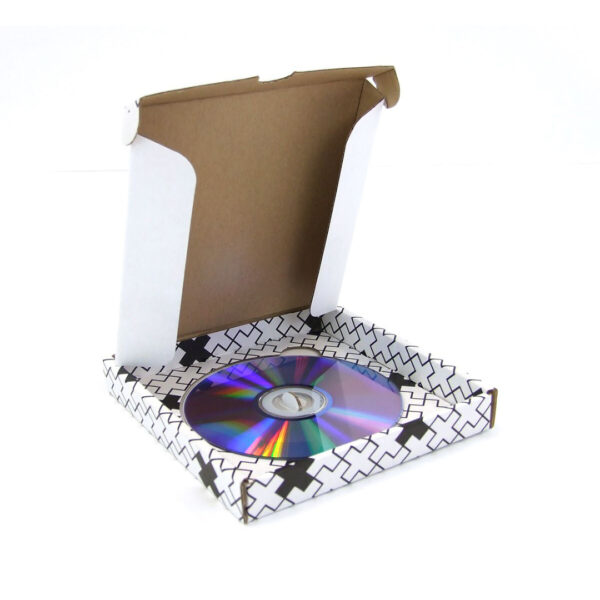
Cardboard CD/DVD Packaging Boxes keep music, movies, games, and backup discs in neat, clearly labelled rows while shielding them from dust, light scuffs, and shelf wear. Designed in wholesale runs by Custom Box Supply, these units give collectors, teams, and archives a calm way to group discs by project, artist, or year without adding heavy furniture.
Description
Cardboard CD DVD Packaging Boxes For Daily Storage Use
Cardboard CD, DVD, and packaging boxes help keep music, movies, and data discs in a clear order for home shelves, offices, and studio storage. When you also use Cardboard Photo Frames Packaging on the same shelves, printed memories and discs can sit in one consistent layout that feels easy to scan. This makes it simpler to maintain one steady media zone instead of scattered stacks in different places. Each disc has a defined spot, so less time is spent searching and more time is spent using the content. Over weeks and months, returning discs to the same box helps keep the whole area under control.
These boxes suit both small collections and growing sets. A single Cardboard CD Storage box can hold favourite albums, podcasts, or family recordings in one place. Larger sets like training discs or client files can be split across multiple units, so each group stays separate and easy to find. Shelves stay tidy, and discs remain upright in rows instead of slipping behind other items. People quickly learn where each type of disc belongs, which reduces mix-ups and missing cases.
Organised Mixed Media Collections In One Place
When discs are stored inside cardboard CD and DVD packaging boxes, every group gets a visible boundary. Sorting can be done by artist, client, year, project, or subject, with each box acting like a small media library. Booklets, photo cards, and inserts can sit with the disc, keeping related items together for future reference. This is useful when returning to older campaigns, lessons, or personal projects and needing everything within one reach.
Many people like the look of a modular shelf-style DVD storage setup without being limited by rigid plastic furniture. Several narrow boxes can sit side by side, each with a clear title and code. Together, they can offer capacity similar to large multi-disc storage layouts while staying easier to lift, rearrange, and recycle. As the collection grows, more boxes can be added without changing the entire shelf plan.
Key Storage Advantages
- Discs stay upright instead of shifting into random piles
- Side panels provide more label space than thin case spines
- Bundled sets keep discs, inserts, and notes together
- Units move easily between shelves, cupboards, and meeting rooms
- Cardboard reduces reliance on hard plastic around the storage area
- Worn units can be placed into common paper recycling streams
Planning Steps For Your First Disc Layout
- List the discs used most often and group them by purpose or topic.
- Measure shelf depth so box lengths sit flush and do not overhang edges.
- Decide whether sleeves, wallets, or plastic cases will sit inside each unit.
- Match board strength to how often the boxes move between rooms or sites.
- Plan simple titles or codes for front and side panels for easy reading.
- Keep one spare unit ready for new discs that arrive during the year.
- Review groups every few months and adjust if habits or projects change.
| Disc Grouping Type | Approx Discs Per Unit | Profile Style | Typical Use Case | Handling Note |
|---|---|---|---|---|
| Audio CDs in sleeves | 10–40 | Compact upright | Music and spoken word sets | Light to carry and simple to label |
| Movie DVDs in sleeves | 15–50 | Medium length | Film and series collections | Helpful when title labels matter |
| Slim DVD cases | 8–30 | Deeper upright | Home cinema and office racks | Works well for upright shelf storage |
| Blu-ray style cases | 6–24 | Shorter, taller | High-definition releases | Supports slightly thicker cases |
| Data backup discs | 20–80 | Long, low profile | IT and backup archives | Easy to tag with date and batch codes |
| Mixed media bundles | 10–25 sets | Custom inner support | Training packs and combo kits | Holds discs plus booklets or inserts |
| Promo sample discs | 25–100 | Light bulk packaging | Events and mailout packs | Handy for quick distribution |
Large Cardboard CD DVD Packaging Boxes For Archives
Large cardboard CD and DVD packaging boxes help teams manage media growth over time by keeping projects, events, and seasons separated into clearly marked units. Many buyers who browse Cardboard Boxes By Functionality prefer larger units so each category can stay in its own container. This layout works well for training teams, studios, schools, and libraries that run recurring media cycles. Each carton becomes a clear segment in a storage system that stays readable across years.
These units fit well on warehouse racks, library shelves, and studio storage rooms. One carton may hold recordings from a single conference, another may store a full year of course content, and another may protect long-term client archives. Over time, rows of dated cartons form a timeline that can be understood from a distance. Large cardboard CD and DVD packaging boxes carry more volume while remaining practical to lift and reposition with care.
Bulk Media Storage Support From Larger Units
A large disc carton can help prepare media for multiple departments, branches, or partner sites from one central space. Inside, smaller bundles can be arranged by region, team, or classroom. People can read the code on the outer panel, open the carton, and identify the correct set to send. This reduces guesswork and helps avoid packing mistakes.
For high-capacity needs, many users prefer several long cartons rather than one heavy storage block. Each carton holds its own range of discs, and front-and-side labels show what is stored inside. If one subject grows faster than others, an additional carton can be added for that group without disturbing the rest. This keeps archives flexible while still structured.
Situations Where Larger Units Work Well
- Training teams update course media each year
- Schools storing exam prep and recorded lessons
- Studios archiving campaigns, edits, and behind-the-scenes media
- Nonprofits keep recordings of talks, workshops, and events
- Software teams storing legacy release discs as offline records
- Libraries and media centres organising mixed-format sections
Simple Archive Planning Process
- Estimate how many discs each project, season, or year usually produces.
- Assign one carton to each major segment rather than mixing unrelated items.
- Decide whether inner bundles will be sorted by month, client, topic, or module.
- Match carton length and height to existing racks, pallets, or cupboards.
- Print project names, years, and codes on both front and side panels.
- Keep a few spare cartons available for sudden growth or special events.
- Move older segments to higher or deeper shelves as new content takes priority.
| Project Style | Disc Volume Trend | Suggested Unit Mix | Storage Placement | Long-Term Aim |
|---|---|---|---|---|
| Client media projects | Medium steady | Several medium and large | Mid-height racks for quick reach | Keep the current work easy to access |
| Annual conference sets | High once per year | A few very large units | Higher racks after each season | Preserve clear records by event |
| Training course series | Constant additions | Balanced small and large | Mixed levels sorted by course | Help trainers locate current modules |
| Software release archives | Heavy technical load | Long sturdy cartons | Controlled storage space | Support retention and audit needs |
| Public event recordings | Irregular spikes | Flexible medium units | Movable racks or trolley setups | Easy redeployment for new occasions |
| Educational media kits | Moderate steady | Medium labelled units | Classroom-side cupboards | Simple access for staff |
| Museum or gallery audio | Slow but important | Strong protective units | Secure archive areas | Protect delicate media for years |
Cardboard CD DVD Packaging Boxes For Different Users
Cardboard CD, DVD, and packaging boxes work best when they match how discs are handled day to day. Some buyers use Cardboard boxes wholesale so their CD, DVD, and mixed media packaging follows the same material standards used across storage cartons and other packaging formats. When sizes and stacking rules stay consistent, shelves and storage areas become easier to manage.
Home collectors often need boxes that fit narrow shelves while keeping titles easy to read. Offices need access during meetings without loose cases spreading across desks. Archives rely on clear coding and safe stacking so cartons can remain in place for years. Planning around these patterns helps the storage system support real habits instead of becoming extra clutter.
Matching Box Styles To Everyday Use
For home setups, a simple Cardboard CD Storage box can hold albums, games, or film discs under one clear label. Several units lined up on a shelf can store a large amount of media while still looking tidy. Grouping by genre, decade, or household member can work well when the same order is followed consistently.
Main Points To Check Before Choosing A Design
- Current disc count and likely growth over the next year or two
- A mix of audio, video, data, and game formats in the collection
- Sorting rules such as by artist, client, year, subject, or branch
- Shelf, cupboard, or rack dimensions in each location
- Preference for plain labelling or designed outer panels
- Delivery routes that may require a stronger board selection
- Recycling goals and material preferences for the space
Straightforward Path From Idea To Filled Units
- Note disc types, quantities, and who uses each group most often.
- Divide content into small, medium, and large sets based on daily activity.
- Match each set with an open or lidded unit, depending on stacking needs.
- Prepare titles, series names, and reference codes for the outer panels.
- Confirm sizes, finishes, and wholesale quantities that fit budget planning.
- Fold units along score lines and load discs in stable upright rows.
- Place the most-used sets at eye level or near main work areas.
| User Group | Main Storage Goal | Suggested Unit Type | Disc Quantity Range | Helpful Extra Detail |
|---|---|---|---|---|
| Home media collector | Organised shelves | Compact upright disc units | 20–120 discs | Notes written along box spines |
| Small business owner | Clear client delivery | Medium labelled cartons | 30–200 discs | Contact details on outer panels |
| Training coordinator | Smooth course rollouts | Lidded coded cartons | 50–400 discs | Course and module codes outside |
| IT administrator | Stable backup archive | Strong long disc units | 100–600 discs | Date and system tags on side panels |
| Creative studio team | Project-based filing | Mix of small and large | 40–300 discs | Colour accents by client or theme |
| Library media manager | Controlled access | Heavy-lidded units | 80–500 discs | Large, readable category labels |
| Event organiser | Post-event media storage | Light carry disc units | 20–250 discs | Event title and year on every unit |